When evaluating the evolution of Google’s mobile operating system, consumer-facing reviews often focus on superficial UI tweaks. However, software engineers and enterprise architects require a clinical understanding of the foundational differences between OS generations. Android 15 (Vanilla Ice Cream) is not defined by massive aesthetic overhauls like Android 12; instead, it is characterized by profound, under-the-hood structural changes that fundamentally did not exist in Android 14.
This deeply technical analysis strips away the marketing jargon to document exactly what architectural capabilities, kernel-level APIs, and hardware integrations were explicitly introduced in Android 15, exposing the widening delta between the new OS and its predecessors.
1. ADPF Efficiency Mode vs. Android 14 Thermal Guessing
In Android 14, game engines and heavy computational apps essentially had to guess a device’s thermal limits, often resulting in aggressive, catastrophic downclocking during sustained loads. Android 15 introduces a completely novel capability to the Android Dynamic Performance Framework (ADPF): explicit Power-Efficiency mode.
For the first time, developer background threads can now signal to the OS kernel that their specific workload prefers extreme power-saving over raw maximum performance. Unlike Android 14’s generic "battery saver" toggle, Android 15 allows the CPU scheduler to actively push these specific background threads to ultra-low-power efficiency cores dynamically, drastically minimizing thermal output without crippling foreground rendering. This is a massive paradigm shift for SoC architecture, particularly relevant for modern silicon like the Qualcomm Snapdragon and MediaTek Dimensity series.
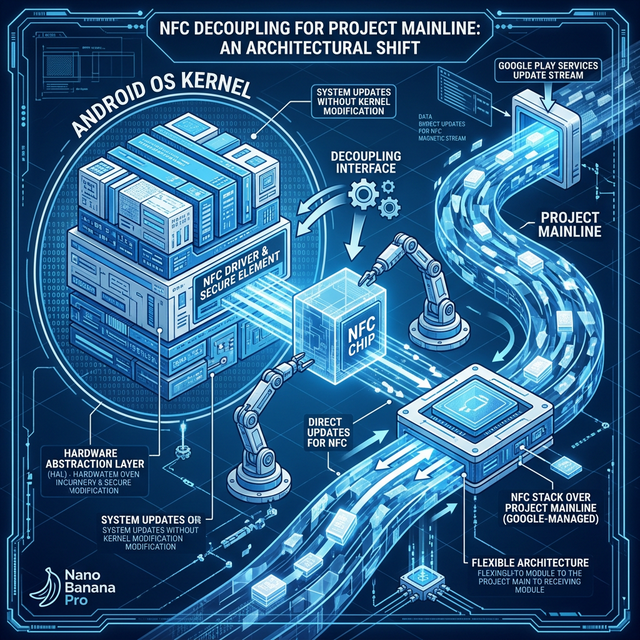
2. Decoupling NFC: Project Mainline Independence
Perhaps the most significant structural change from a maintenance perspective is the total modularization of the NFC (Near Field Communication) stack. In Android 14, the core NFC logic was immutably baked into the monolithic OS firmware tree. If a critical zero-day exploit was discovered in the NFC protocol, users had to wait months for an OEM (like Samsung or Xiaomi) to issue a complete, heavyweight system OTA (Over-The-Air) update.
Android 15 extracts the entire NFC networking stack and repackages it as a deeply unprivileged Project Mainline module. This means Google can now silently push critical NFC security definitions, protocol updates, and driver patches directly through the Google Play Store background services in mere hours, entirely bypassing carriers and sluggish OEM update cycles. This modularity simply did not exist for NFC prior to Android 15.
3. Replacing Legacy Rendering: The Native PdfRenderer API
Historically, manipulating PDF files on Android has been an absolute nightmare for developers. Android 14 relied on antiquated, primitive rendering libraries that frequently crashed when attempting to load massive architectural blueprints or complex, multi-layered vector documents, forcing developers to bundle massive third-party PDF SDKs into their APKs.
Android 15 introduces a completely overhauled, native PdfRenderer API. It natively incorporates highly advanced features that were previously impossible without external bloat: rendering password-protected PDF documents directly in-memory, natively selecting and copying embedded text strings, directly searching PDF metadata, and rendering complex form annotations at 60fps. This fundamental API rewrite elevates Android 15’s enterprise-grade document handling far beyond Android 14 capabilities.

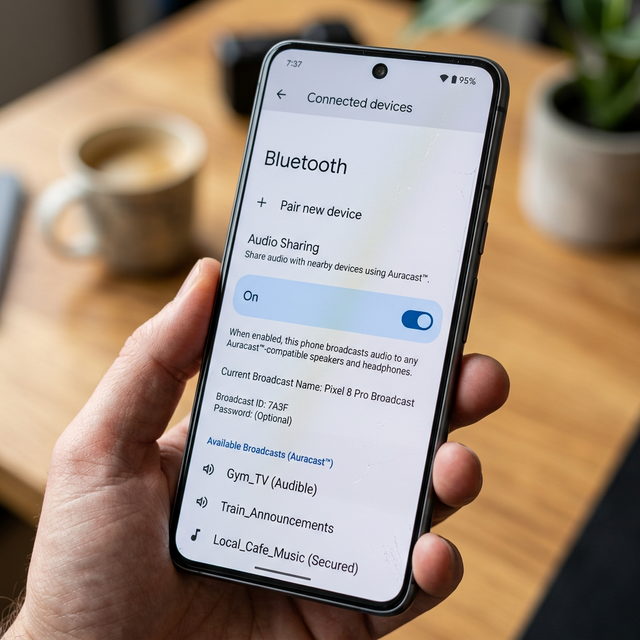
4. Native Bluetooth Auracast Broadcasting
While Android 14 supported basic Bluetooth LE Audio connections (if the OEM enabled it), Android 15 is the first version to natively build Auracast Broadcast Audio architecture directly into the core AOSP Bluetooth stack UI.
Auracast allows a single Android 15 device to function as an audio broadcast tower. Instead of standard 1-to-1 Bluetooth pairing, you can seamlessly broadcast a single continuous high-fidelity audio stream to a theoretically infinite number of Auracast-compatible headphones or hearing aids simultaneously in your immediate vicinity. Android 15 introduces the dedicated "Audio Sharing" UI and underlying network scanning protocols directly into the Settings menu, standardizing a feature that was previously fragmented or entirely absent in Android 14.
5. Cryptographic Isolation: Private Space vs. App Hiding
Android 14 allowed users to somewhat obfuscate apps by relying on third-party custom launchers to hide the icon from the drawer. However, the app still ran in the background within the primary user profile, leaking data, consuming RAM, and displaying notifications if left unmanaged.
Android 15 introduces Private Space at the OS level. This is not folder hiding; it is the instantiation of a cryptographically isolated secondary user profile running simultaneously alongside your primary profile. When you lock the Private Space, Android 15 forcefully tears down the processes of the apps inside, unmounting their secure encrypted storage partition. They consume zero background battery resources and physically cannot trigger notifications until the partition is decrypted with an independent biometric key. This degree of native AOSP kernel isolation is entirely new to Android 15.
Conclusion
Upgrading from Android 14 to Android 15 is not about acquiring new wallpapers or widget shapes. It is about accessing a profoundly redesigned operating system architecture. By decoupling vulnerable NFC stacks via Project Mainline, exposing extreme low-level thermal controls via the ADPF Efficiency Mode, and natively engineering Auracast and Private Space isolation, Android 15 provides the robust technical foundation required for the next half-decade of mobile computing. For more detailed hardware compatibility analyses, keep reading our deep technical breakdowns on the MobileKiShop Homepage.