
Mentioning someone on an Instagram Story is a great way to give them a shout-out, tag them in shared moments, collaborate with other creators, or direct your followers to their profile. When you mention someone, they receive a notification and can reshare your story to their own audience. This guide covers every method to mention someone on Instagram Stories, along with tips and frequently asked questions in 2026.
Method 1: Using the Text Tool
The most common way to mention someone in your Instagram Story is by typing their username using the text tool.
Step-by-Step Instructions
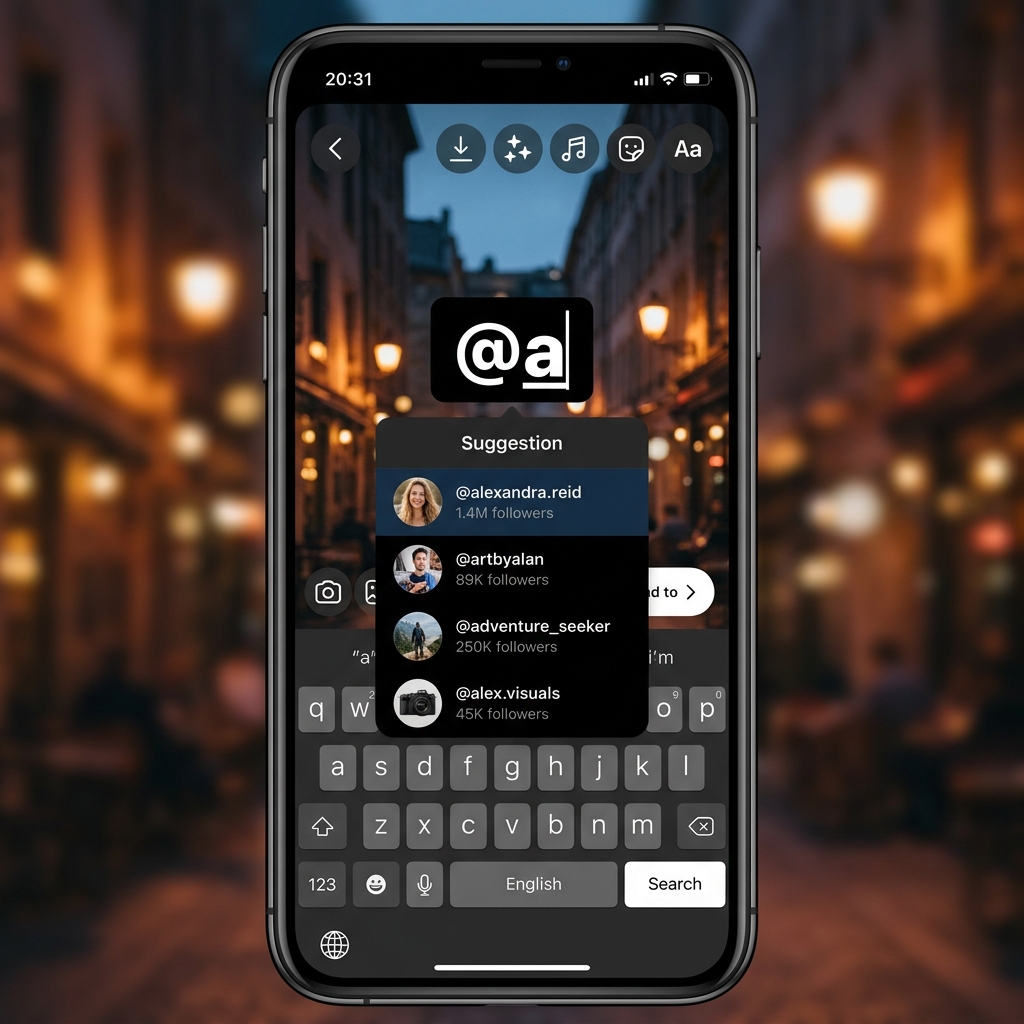
Open the Instagram app and swipe right from the home feed or tap the + icon and select Story. Capture a photo or video, or choose one from your gallery. Tap anywhere on the screen or tap the Aa text icon at the top of the screen. Type the @ symbol followed by the username of the person you want to mention (for example, @username). As you type, a dropdown suggestion list will appear showing matching usernames. Tap the correct username from the suggestions to complete the mention. The mention will appear as clickable text on your story. You can resize, reposition, and change the color of the mention text just like any other text element.
Customizing the Mention Text
After adding the mention, you can customize its appearance to match your story design. Tap the mention text to select it. Use the color palette at the top to change the text color. Tap the font name at the top to cycle through different font styles including Modern, Neon, Typewriter, Strong, and Classic. Pinch to resize and drag to reposition the mention anywhere on your story. You can add multiple mentions by repeating the process for each person you want to tag.
Method 2: Using the Mention Sticker
Instagram also provides a dedicated Mention sticker that creates a stylized, tappable mention badge on your story.

Step-by-Step Instructions
Create your story by capturing or selecting content. Tap the sticker icon (smiley face square) at the top of the editing screen. Scroll through the sticker tray and tap @Mention (it may also appear as MENTION). Type the username of the person you want to mention. Select the correct account from the suggestions. The mention sticker will appear on your story as a styled badge. You can tap the sticker to cycle through different background color styles. Drag and pinch to reposition and resize the sticker as needed.
Text Mention vs Sticker Mention
Both methods create a functional, tappable mention that links to the tagged person profile. The text mention gives you more control over font style, color, and size. The sticker mention provides a pre-designed badge that stands out visually and can be color-cycled with a tap. Both methods trigger the same notification to the mentioned person and both allow them to reshare your story.
What Happens When You Mention Someone
Understanding what happens after you mention someone helps you use this feature effectively.
Notification
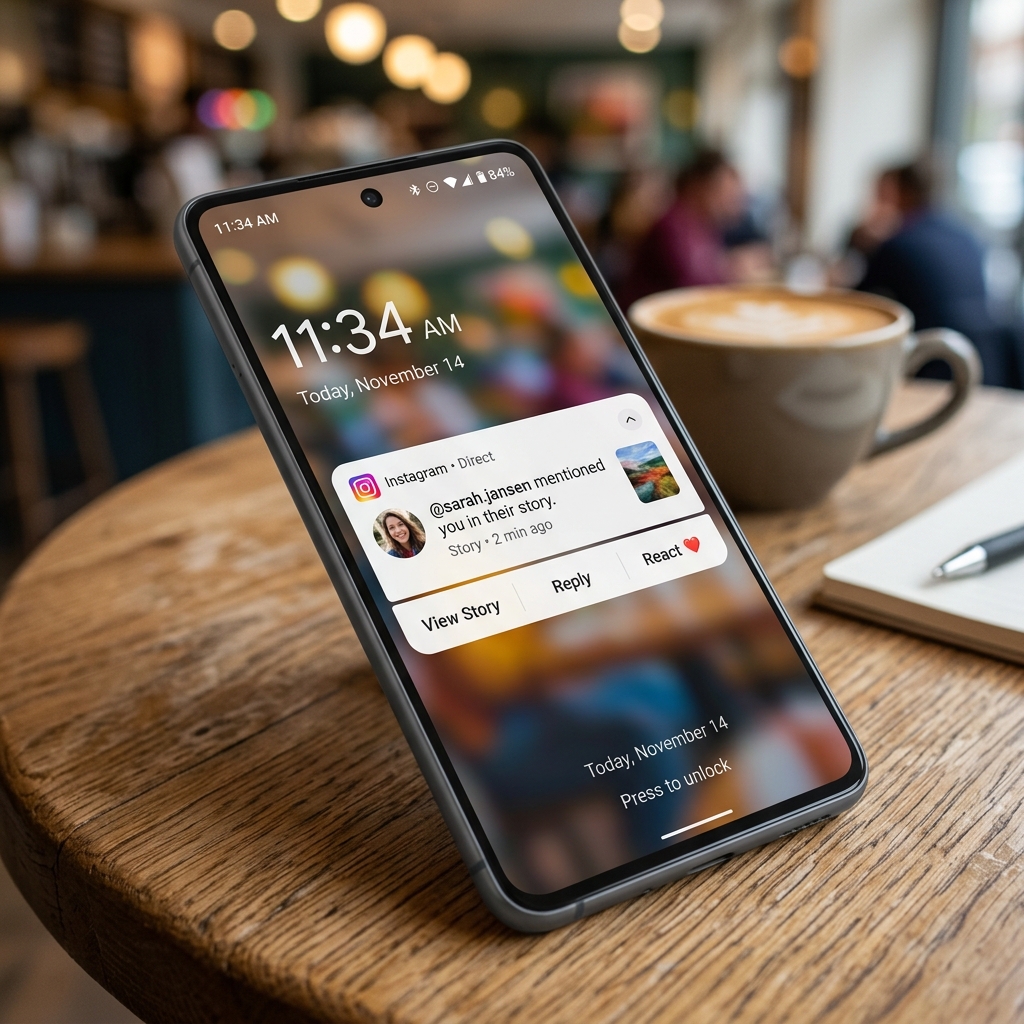
The mentioned person receives a direct message in their Instagram DM inbox notifying them that you mentioned them in your story. The notification includes a preview of your story. If they follow you, the notification appears prominently. If they do not follow you, the notification may appear in their message requests folder depending on their privacy settings.
Resharing Ability
When someone is mentioned in a story, they get the option to Add This to Your Story directly from the notification. Tapping this option lets them reshare your story to their own audience with an attribution link back to your original story. This resharing feature is one of the most powerful aspects of story mentions for cross-promotion and collaboration between accounts.
Viewer Interaction
Anyone viewing your story can tap on the mention to see a popup showing the mentioned person username and profile photo. From this popup, they can tap View Profile to visit the mentioned person Instagram profile. This makes mentions an effective way to drive traffic to other accounts, businesses, or collaborators.
How to Mention Someone in a Reel Story
When sharing a Reel to your story, you can add mentions in the same way as regular stories. After selecting a Reel to share as a story (by tapping the paper airplane icon under the Reel and selecting Add to Your Story), the story editing screen opens. From here, use either the text tool or the mention sticker to add usernames. The mentions will be fully functional and tappable when viewers watch the story.
Mentioning Multiple People
Instagram allows you to mention multiple people in a single story. You can add up to 10 mentions per story slide. To mention multiple people, simply repeat the text or sticker method for each person. You can arrange multiple mentions creatively around your story content. If you are tagging a large group, consider using smaller text sizes to keep the story visually clean. Each mentioned person will receive their own individual notification in their DM inbox.
Privacy and Mention Controls
Instagram provides settings that let you control who can mention you in their stories.
Managing Who Can Mention You
Go to your Profile and tap the hamburger menu (three horizontal lines). Select Settings and Privacy. Navigate to Tags and Mentions. Under Allow @Mentions From, choose one of the following options: Everyone allows any Instagram user to mention you, People You Follow restricts mentions to accounts you follow back, and No One completely disables the ability for others to mention you in their stories.
Troubleshooting Common Issues
Mention Not Working
If your mention is not becoming clickable, make sure you are typing the @ symbol before the username with no space between them. Verify that the username is spelled correctly by checking if it appears in the suggestion dropdown. If the person has a private account and has restricted mentions, you may not be able to tag them. Ensure your Instagram app is updated to the latest version, as older versions may have bugs with the mention feature.
Person Not Receiving Notification
If the mentioned person says they did not receive a notification, they should check their Message Requests folder in DMs (for accounts they do not follow). They may have notifications turned off for story mentions in their Instagram notification settings. The notification may also be delayed during high-traffic periods on the platform.
Tips for Using Mentions Effectively
Use mentions to give credit when sharing someone else content or when reposting user-generated content. Mention brands or businesses when reviewing their products to increase the chance of them resharing your story to their larger audience. When collaborating with other creators, mention each other in stories to cross-promote and grow both audiences. Avoid overusing mentions or spamming irrelevant accounts, as this can lead to your account being flagged. Make mentions visually attractive by matching their color and font to your overall story design aesthetic.
Conclusion
Mentioning someone on an Instagram Story is a simple yet powerful feature for connecting with other users, giving shout-outs, and enabling cross-promotion. Whether you use the text tool for full customization or the mention sticker for a quick stylized tag, the process takes just seconds and opens up opportunities for meaningful engagement. By understanding the mention notification system, privacy controls, and creative best practices covered in this guide, you can use Instagram Story mentions effectively to grow your presence in 2026.